

Restaurant Technology Stack Explained: Network, POS, Security, Surveillance & Compliance
A restaurant technology stack is the complete system of tools and infrastructure that keeps a restaurant operating.
Think POS systems, payment terminals, Wi-Fi networks, kitchen displays, security cameras, and the network that connects them all.
When that system works, service feels effortless. When one piece fails, the entire operation slows down.
In this guide, you’ll learn how a modern restaurant technology stack works and what compliance safeguards keep locations running uninterrupted.
Key Takeaways
- Your stack is a connected ecosystem of hardware, payments, and security.
- Systems that don’t talk to each other create downtime and data gaps.
- Growth requires a single blueprint and a central dashboard for every location.
- Security should be built into your network segmentation and automated logs.
- A solid stack is an investment in consistent profit and brand protection.
What Is Included in a Restaurant Technology Stack?
Most operators think of their stack as the POS and maybe the Wi-Fi router. The real picture is wider.
A complete restaurant technology stack runs across eight layers:
- POS terminals and kitchen display systems (KDS) handle the transaction and the kitchen at the same time. Orders flow from the front of house to the kitchen without a paper ticket or a shouted call.
- Payment processing sits on top of the POS. It’s the gateway that encrypts the transaction, routes it to the processor, and settles with the bank. Each handoff is a security event.
- Network infrastructure carries everything. Firewalls, switches, access points, and VLAN segmentation determine whether your POS traffic ever touches a guest’s phone.
- Cloud platforms host reporting dashboards, remote configuration, and disaster recovery. A manager in Chicago can see real-time sales data from a Denver location without touching a local server.
- Cybersecurity controls include endpoint protection, multi-factor authentication (MFA), endpoint detection and response (EDR), and security information and event management (SIEM) tools that aggregate logs across all locations.
- Surveillance systems cover POS terminals, cash drawers, entry points, and dining areas. Footage routes to a network video recorder (NVR) with secure remote access.
- Integrations and data platforms connect POS to online ordering, delivery apps, inventory, accounting, and loyalty programs via APIs.
- Centralized monitoring and support closes the loop. Someone should always be watching, alerting, and responding around the clock.
Core Components at a Glance
| Layer | Examples |
|---|---|
| POS + KDS | Toast, Square for Restaurants, Aloha |
| Payment | Stripe, Heartland, TSYS |
| Network | Cisco Meraki, Fortinet, Ruckus |
| Cloud | AWS, Azure, Lightspeed |
| Security | CrowdStrike, Duo MFA, Splunk SIEM |
| Surveillance | Axis, Hanwha, Milestone NVR |
| Integrations | API-connected delivery, inventory, loyalty |
| Monitoring | 24/7 NOC, centralized alerting |
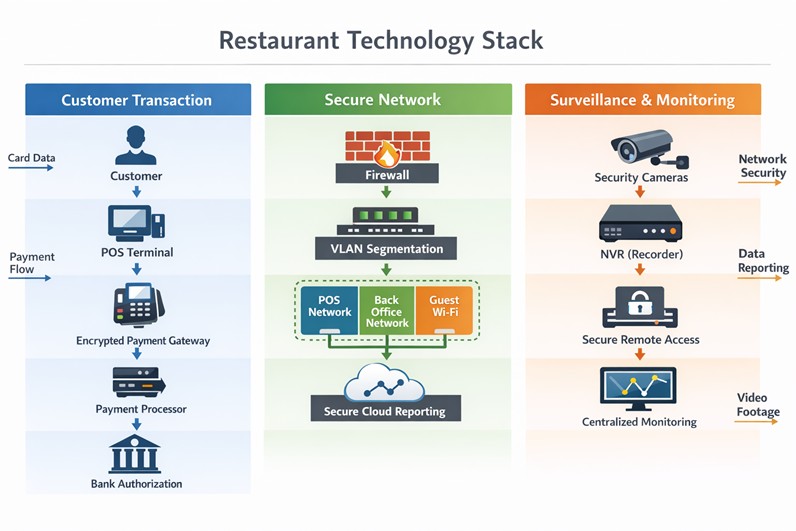
How POS, Network, and Surveillance Systems Integrate
The transaction path looks simple from the customer’s side. Behind the counter, it is a chain of dependent systems.
A customer taps a card. The POS terminal sends an encrypted authorization request through the firewall, across a segmented network VLAN dedicated to payment traffic, to the payment gateway.
The gateway routes to the processor. The processor returns an approval. That entire sequence happens in under two seconds.
It fails the moment any segment of the network is misconfigured or down.
Surveillance overlaps at the POS terminal itself. Camera coverage of cash drawers and card readers is both a theft deterrent and a compliance control.
When an exception report flags a void or a refund, managers can pull footage from the same timestamp without leaving the back-office dashboard.
Logs from the firewall, POS, and surveillance system all feed into centralized monitoring. That is how you catch an anomaly at 2:00 AM in a closed location without sending a technician on-site.
What Technology Does a Modern Restaurant Need?
Split it into three categories. Each serves a different function.
Operational technology
POS, KDS, inventory management, and labor scheduling keep the food moving. A QSR running lunch without a KDS is relying on voice and paper. Both fail at volume.
Customer experience technology
Online ordering platforms, delivery integrations (DoorDash, Uber Eats), loyalty systems, and CRM platforms that recognize repeat customers keep the guests coming. Loyalty program data is only useful if it flows back into the POS automatically.
Infrastructure technology
Network hardware, firewalls, SD-WAN for multi-location bandwidth management, and Wi-Fi systems with separate SSIDs for operations and guests keep the former two functions running.
Skipping infrastructure investment to save on hardware costs is the most common mistake multi-unit brands make. A $300 consumer router running POS traffic at a franchise location is a compliance violation and a single point of failure.
What Defines Enterprise-Grade Restaurant Infrastructure?
The difference between a single-location setup and an enterprise-grade stack is architecture and oversight.
Enterprise-grade infrastructure has centralized control. A network configuration change at one location deploys from a cloud management platform, not from someone physically touching a switch.
A security patch rolls out across 50 locations in a controlled sequence, never ad hoc.
It also has redundancy built in. A secondary ISP failover means a fiber cut does not kill service during Friday dinner rush.
A five-table backup ordering process is not the same as an ISP failover. One costs $50 per month, the other costs you the entire service period.
Enterprise-Grade Infrastructure Checklist
- Cloud-managed firewalls with centralized policy enforcement
- Segmented POS networks isolated from guest Wi-Fi
- Centralized log aggregation across all locations
- MFA enforcement on all administrative accounts
- 24/7 network monitoring with defined escalation paths
- Secondary ISP failover at revenue-critical locations
- Controlled update deployment — no auto-updates during service hours
- Encrypted payment processing end-to-end
If any of these are missing, the stack has an unaddressed gap.
Explore SpecGravity’s restaurant IT solutions
How Restaurant IT Supports PCI Compliance
Payment Card Industry Data Security Standard (PCI DSS) compliance is enforced through infrastructure. The paperwork is secondary.
The most common gap operators discover during an assessment is guest Wi-Fi and POS traffic sharing the same network. That single misconfiguration puts an operator out of compliance regardless of how many security policies they have signed.
The infrastructure requirements PCI demands:
- Network segmentation. POS traffic must run on a VLAN completely isolated from guest Wi-Fi, back-office systems, and any device that does not need to touch payment data.
- Encrypted transmission. Payment data must be encrypted in transit. End-to-end encryption (E2EE) at the card reader means unencrypted card data never touches the POS software.
- Access controls. Role-based access limits who can log into systems that touch payment data. Every account is individual without shared credentials.
- Logging and monitoring. Every access event, configuration change, and authentication attempt is logged. Centralized log aggregation makes those logs reviewable and auditable.
- Quarterly vulnerability scans. An approved scanning vendor (ASV) runs external scans each quarter. Internal scans cover the rest.
- Incident response plan. A written, tested plan for what happens when a breach occurs. The plan needs to exist before the breach, not after.
PCI Compliance Infrastructure Requirements
| Control | What It Requires |
|---|---|
| Network segmentation | Isolated POS VLAN, no overlap with guest Wi-Fi |
| Encrypted transmission | E2EE from card reader to processor |
| Access control | MFA, individual accounts, least-privilege |
| Log monitoring | Centralized SIEM, 90-day retention minimum |
| Vulnerability scanning | Quarterly ASV scans + internal scans |
| Incident response | Documented, tested, staff-trained plan |
The FBI’s Internet Crime Complaint Center puts the average SMB breach cost above $200,000. The U.S. Small Business Administration has found that 43% of small businesses fall victim to cyberattack. Only 14% are adequately prepared to defend themselves.
PCI compliance is the structural layer that determines whether a breach costs you a fine or costs you the business.
Book a compliance and infrastructure assessment
How Do Restaurant Systems Integrate Together?
The POS is the center of gravity for most integration work. Every platform it connects to either improves operational visibility or creates a liability when the connection breaks.
Critical POS integrations:
- POS + payment processor. The most direct integration. Any misconfiguration here stops transactions entirely.
- POS + online ordering. Orders from the restaurant’s website or app should flow directly into the POS and KDS without manual re-entry. Manual re-entry introduces errors and slows tickets.
- POS + delivery platforms. DoorDash, Uber Eats, and Grubhub orders need to reach the kitchen in real time. Tablet-based workarounds that require staff to manually enter delivery orders are a volume problem waiting to happen during a Saturday night rush.
- POS + inventory management. Automatic deduction of ingredient usage per menu item sold. When a chicken dish sells 200 times, the system adjusts inventory without a manager counting bins.
- POS + accounting software. Daily sales data posts to QuickBooks or NetSuite automatically. Manual export processes break during high-volume periods and during staff turnover.
- POS + CRM and loyalty. Customer purchase history ties to loyalty rewards. A returning guest gets recognized at the POS. The data is only useful if the CRM receives it in real time.
Integrated vs. Fragmented Stack
| Category | Integrated Stack | Fragmented Stack |
|---|---|---|
| Data flow | Real-time sync | Manual exports |
| Reporting | Centralized dashboard | Inconsistent, location-by-location |
| Security posture | Standardized controls | Variable by location |
| PCI compliance | Enforced by architecture | Exposed by gaps |
| Scalability | New locations plug in | Each location is a new project |
Poor API dependencies are where brands feel fragmentation most. A delivery platform updates its API. The integration breaks. Orders stop routing to the kitchen. By the time someone notices, a Friday dinner service is already compromised.
What Cloud Platforms Are Used in Restaurants?
Cloud infrastructure in restaurants falls into two categories: hosted software and cloud-managed networking.
Hosted software includes cloud-based POS systems (Toast, Square), multi-location reporting dashboards (Crunchtime, Avero), and cloud backup systems that replace on-premise servers.
The practical value is remote visibility. The IT director can access configuration settings, pull sales reports, or push a software update from any location without dispatching a technician.
Cloud-managed networking (Cisco Meraki, Fortinet FortiManager) lets IT teams manage firewall rules, Wi-Fi configurations, and VLAN policies across every location from a single portal.
For a brand opening a new store, provisioning the network becomes a template deployment, not a week of on-site configuration.
Cloud backup adds disaster recovery capability without maintaining local storage hardware. If a location’s POS server is damaged or stolen, data restores from the cloud rather than disappearing.
How Restaurants Automate Operations with Technology
Automation in a restaurant context means removing manual steps that slow down operations or introduce errors.
Inventory auto-sync connects sales data to stock levels. When a menu item sells, the system deducts ingredients automatically. Managers see depletion rates in real time and can set par-level alerts that trigger purchase orders before a product runs out mid-service.
Labor forecasting uses historical sales data to predict staffing needs. A system trained on 18 months of traffic data will schedule closer to actual demand than a manager working from memory.
Online order routing sends delivery and pickup orders directly to the KDS without staff intervention. The KDS prioritizes by pickup time, not by when the order arrived.
Automated reporting delivers daily sales summaries, labor cost ratios, and void reports to managers and executives without a single manual export. When a general manager gets a 6:00 AM sales summary in their inbox every morning, they stop the day already oriented.
Security alerting notifies IT staff when a firewall rule is violated, a device connects to the wrong VLAN, or a login attempt fails repeatedly. Automated alerts mean a threat gets a response in minutes, not after the next scheduled review.
How Much Does a Restaurant Technology Stack Cost?
Costs scale with brand size and infrastructure maturity. These are realistic ranges, not catalog prices.
| Category | Single Location | Multi-Unit Brand |
|---|---|---|
| POS hardware | $3,000 – $10,000 | Scaled per location |
| Network hardware | $1,000 – $5,000 | Enterprise contracts |
| Surveillance | $2,000 – $8,000 | Enterprise systems |
| Security software | $100 – $500/mo | $1,000 – $5,000+/mo |
| Managed IT support | $300 – $700/mo | $3,000 – $10,000+/mo |
Compare that against a single POS outage during a Friday dinner service. Two hours of downtime at a mid-volume QSR can exceed $5,000 in lost revenue before the technician arrives.
The managed IT line item is where brands most often underinvest. Use the SpecGravity support cost calculator to size what coverage costs relative to your location count and revenue exposure.
How Restaurants Manage Data Across Systems
Multi-unit brands running a fragmented stack spend a disproportionate amount of time reconciling data that should sync automatically.
The right architecture routes all transactional data through a centralized cloud platform. Each POS location sends sales, voids, labor clock-ins, and inventory events to a data warehouse in real time.
Reporting tools pull from that warehouse, not from individual location exports.
Role-based access determines who sees what. A general manager sees their location’s data. A regional director sees the region. The CFO sees everything. Access control is a compliance requirement, not just a convenience.
API governance matters at scale. When one platform updates its API, the integration layer needs to detect the change and alert someone before a silent failure propagates through reporting for a week before anyone notices.
Conclusion
Restaurant technology problems rarely come from a single device failing. They come from systems that were never designed to operate as one.
The brands that avoid opening-day chaos and long-term security issues follow a simple principle: treat technology infrastructure like operational infrastructure. The same way kitchens are designed for workflow and safety, the technology stack has to be designed for reliability, security, and repeatability.
For restaurant operators, that means focusing on a few non-negotiable standards:
- Standardize the architecture
- Separate critical systems
- Document everything
- Test the full service workflow before opening
When these foundations are in place, technology is no longer a daily operational risk but a stable platform the business can grow on.
For multi-unit brands, that difference is what allows new locations to open smoothly.
Explore SpecGravity’s restaurant technology solutions to design a secure, scalable stack built for multi-unit operations.
FAQ
What is included in a restaurant technology stack?
It’s a connected ecosystem: your POS, payment processing, network, and security cameras, all tied together by cloud platforms and cybersecurity. Think of it as a single engine where every part depends on the others to keep the restaurant running.
What technology does a modern restaurant need?
At a minimum, you need a secure POS, a segmented network to protect data, and encrypted payments. You also need cloud reporting to see your numbers and endpoint protection to stop hackers before they hit your registers.
How do restaurant systems integrate?
They talk to each other through APIs—digital bridges connecting your POS to delivery apps, inventory, and accounting. If one bridge breaks, the system fails silently; centralized monitoring is what catches those gaps before your next rush.
How does IT support PCI compliance?
Compliance determines how your network is built. By using encryption, locking down who can access data, and keeping automated logs, you make security a natural part of your infrastructure rather than a manual chore.
How much does a restaurant tech stack cost?
Hardware usually starts at a few thousand dollars per site. Monthly support ranges from $300 for one shop to over $10,000 for large brands. It’s a significant investment, but it’s still cheaper than the cost of a single data breach or a weekend of downtime.
What cloud platforms are used in restaurants?
Most brands use cloud-based POS systems, remote reporting dashboards, and managed networking. The goal is remote access. Specifically, being able to see and fix what’s happening at any store without having to physically be there.
How can restaurants automate operations?
Tech can handle the busy work, such as deducting inventory as you sell, forecasting labor needs, and routing online orders straight to the kitchen. Automating these steps cuts down on human error and keeps things moving when the pressure is on.